
Description

Original price was: $1,345.00.$956.00Current price is: $956.00.
-
The Pro Tools Production I (PT201) course covers the core concepts and skills needed to operate an Avid Pro Tools Ultimate system in a professional studio environment. This course builds on the Pro Tools Fundamentals I and II series of courses, providing intermediate and advanced-level Pro Tools concepts and techniques.
Students learn to customize the configuration of Pro Tools Ultimate systems to maximize results and improve recording, editing, and mixing workflows. The hands-on exercises provide experience optimizing system resources, configuring I/O, navigating and color-coding, managing session media, using advanced selection and auditioning techniques, working with clip gain, applying advanced automation techniques, creating submixes and applying parallel processing, advanced mixing and finishing techniques for a final mixdown.
This course provides the foundational training for the Avid Certified | Pro Tools Music Professional and Avid Certified | Pro Tools Post Professional certification exams.
Candidates wishing to sit either of these certification exams must have firstly passed the Avid Certified | Pro Tools Specialist certification exam.
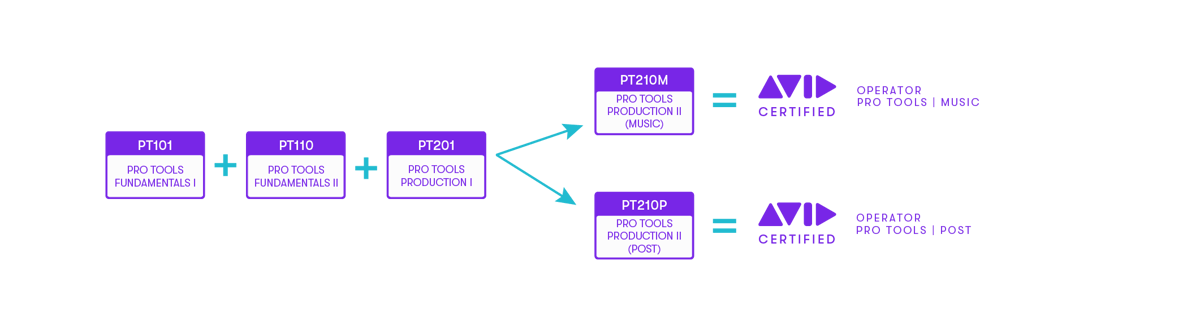
This course is designed for end-users with intermediate Pro Tools skills
Completion of the following courses, or equivalent experience:
At the end of this course you will be able to:
Only logged in customers who have purchased this product may leave a review.

-
Add to cart
-
Add to cart
-
Add to cart
-
Add to cart
Reviews
There are no reviews yet.